Utility · Survival
Find My Stuff
Find items across nearby chests from one screen.
Search loaded storage nearby, plan materials for a build and gather what you still need from multiple containers.
Published on TDGL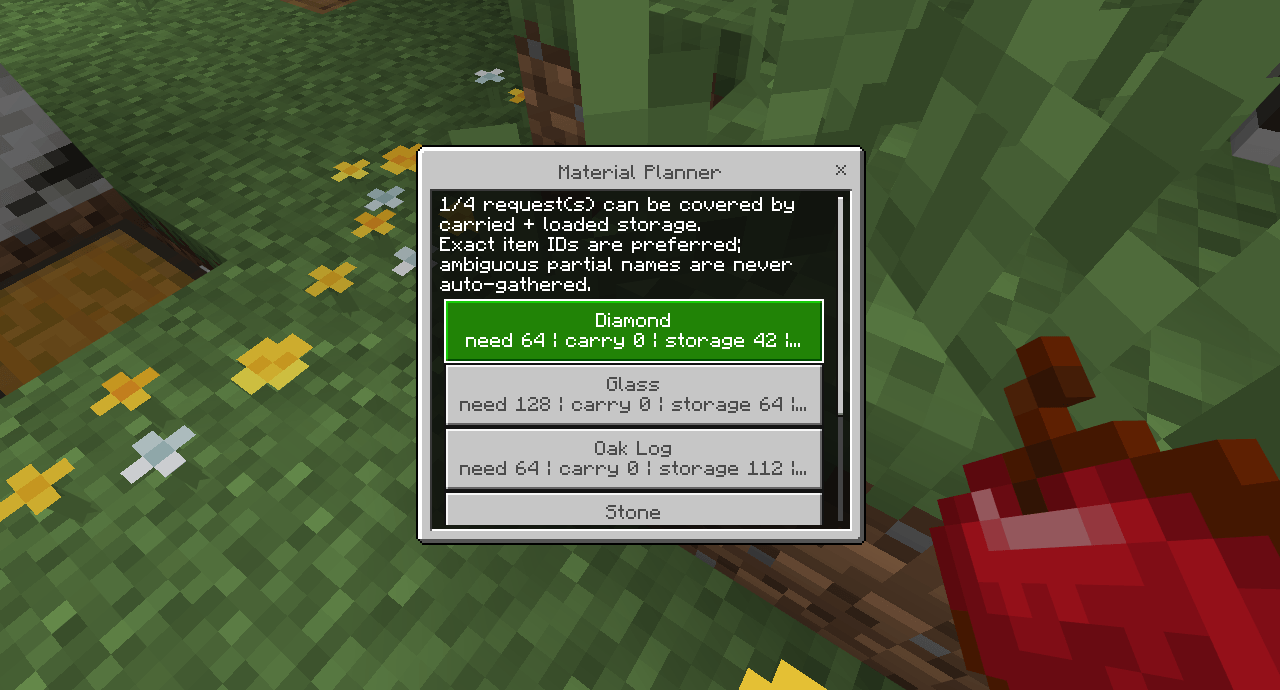
- Bedrock
- 26.40+
- Version
- v0.3.0
- Release
- Stable
- Package
- MCADDON · 18.5 KiB
- Script API
- @minecraft/server 2.9.0 · @minecraft/server-ui 2.1.0
What it does
- Search by item name or ID and see counts and container locations.
- Compare a material list with your inventory and nearby storage.
- Review the gather plan before retrieving the exact quantity still needed.
In game
Plan your materials
Material PlannerIN-GAME
Version 0.3.0
CurseForge release
Installation
- 1
Open the .mcaddon in Minecraft Bedrock and activate its behavior and resource packs in your world.
- 2
Craft the Storage Finder with one compass, two copper ingots and two amethyst shards.
- 3
Use the Storage Finder to open the Virtual Catalog or Material Planner.
Compatibility
- Requires Minecraft Bedrock 26.40 or later. Tested on Minecraft for Windows 26.50.
- The catalog reads containers in loaded chunks.
Release notes

Latest releaseFind My Stuff v0.3.0Release 0.3.0
- Version 0.3.0 adds the Virtual Catalog, Material Planner and a confirmation before gathering.